
When Sony announced the PlayStation Portal (hereafter PS Portal), the first reaction from many gamers might have been: “It’s actually a streaming handheld, not an independent gaming handheld?” After all, using PS5 Remote Play via phones or tablets isn’t exactly new. However, after getting hands-on with the PS Portal and spending considerable time with it, I have to say, what Sony has delivered is far more refined, focused, and in some aspects, even better than expected. It’s not meant to replace your phone or Steam Deck; it aims to be the most seamless and comfortable extension of your PS5 experience.
First Impression: Feels Like Original Hardware, Not an Accessory
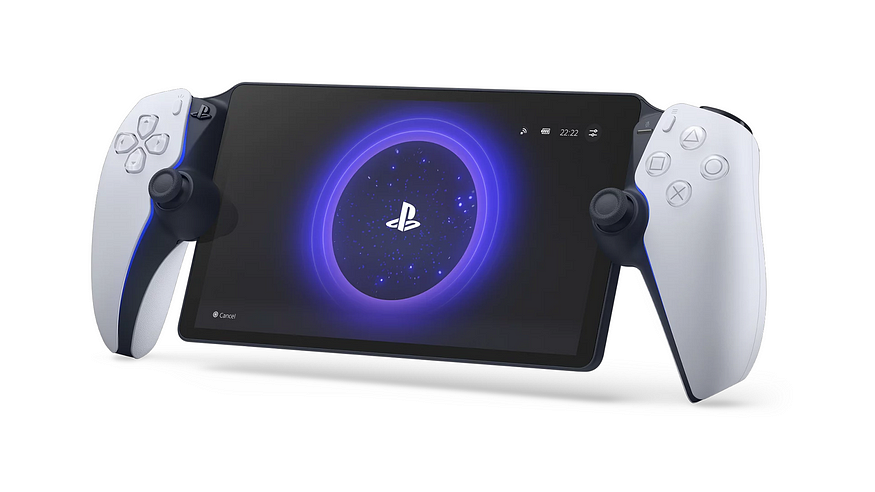
Unboxing the PS Portal brings a sense of familiarity yet novelty. It looks like a DualSense controller precisely split in half with a large 8-inch screen embedded in the middle. And the build quality is the first pleasant surprise. Despite being positioned as a PS5 accessory with a relatively modest price, the overall feel, material choice, and button feedback far exceed expectations for its price point. It feels solid in the hands, devoid of any cheapness, more like a standalone, well-engineered piece of hardware.
Screen Experience: LCD’s Counterattack, Stunning Visuals Rivaling OLED

The PS Portal features an 8-inch, 1080p, 60Hz LCD screen. When the specs were announced, many (myself included) lamented the lack of OLED. However, actually powering on the screen and jumping into a game completely dispelled my doubts. This LCD performs surprisingly well! Brightness is ample, colors are tuned very pleasingly, and contrast is quite good. When playing visually rich and complex games like Horizon Forbidden West or Marvel’s Spider-Man 2, the picture is vivid and detailed. The “beauty” of its display quality, in actual gameplay, truly holds its own against many OLED screens, especially with well-controlled motion blur in fast-paced scenes. Unless you’re doing a side-by-side comparison in extremely dark scenes, you’ll hardly find fault with this screen during everyday gaming.
Controller Handling: The Authentic Soul of DualSense
This is undoubtedly the PS Portal’s core strength. It doesn’t just “simulate” the DualSense; it inherits nearly the entire essence of the PS5 DualSense controller. From the tension feedback of the L2/R2 adaptive triggers to the nuanced and rich Haptic Feedback, down to the button layout and analog stick feel — everything is identical to holding an official DualSense. This means playing PS5 games on the PS Portal provides the exact same core control experience as sitting in front of your TV, something unmatched by any third-party controller or phone clip solution.
Lightweight Design: Comfortable for Long Sessions

Despite appearing like a DualSense with an added screen, the PS Portal’s weight is remarkably well-managed (around 529g), making it lighter than the Steam Deck LCD (approx. 669g) or the ROG Ally (approx. 608g, Ally X might be heavier). In hand, the weight distribution is balanced, and combined with the excellent ergonomics inherited from the DualSense, the strain on the wrists is relatively minimal during extended play sessions, making it very comfortable and relaxing to use.
Connectivity Performance: Network is Key, Stability means Perfection
The PS Portal is fundamentally a Remote Play device; network quality is the lifeline determining the experience. After using it for a while, I can confidently say: as long as your network environment is strong, the PS Portal streaming experience is near-perfect. Using stable Wi-Fi at home (5GHz preferred) or a good 5G mobile hotspot connection outdoors results in smooth gameplay with extremely low latency. Lag or noticeable image compression/artifacts are virtually non-existent. The picture remains stable at a crisp 1080p/60fps. Of course, if the network conditions are poor (e.g., weak or congested Wi-Fi, unstable 4G), latency and image degradation are inevitable. However, Sony’s optimizations in streaming technology are palpable; connection stability and image quality feel significantly better than past experiences using the Remote Play app on a phone.
Core Limitation: An Extension of PS5, Not an Independent Universe
This is the most crucial aspect to understand about the PS Portal: it requires a PlayStation 5 console that is turned on or in rest mode to function. It cannot run any games natively, nor can it independently stream games from the cloud (PS Plus Premium cloud streaming). All your game content originates from your PS5 console. This means:
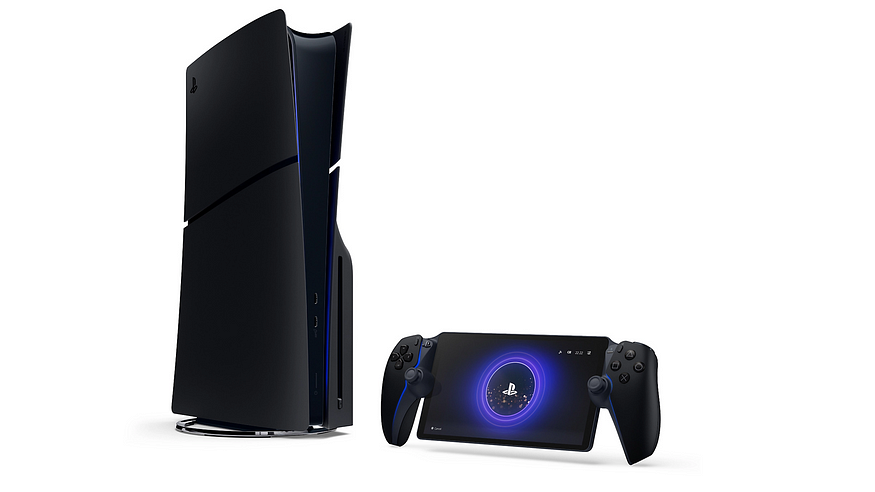
- You must own a PS5.
- Your game library is limited to the PS5 platform.
Competitor Comparison: Specialization vs. Versatility
Let’s compare the PS Portal to the two currently most popular handhelds: Steam Deck and ROG Ally X.
- Steam Deck / ROG Ally X: These are independent handheld gaming PCs. They can natively run a vast library of Steam games and titles from other PC platforms, offering more versatility and the ability to install various applications. However, they might face challenges with performance, cooling, and battery life when running demanding AAA games natively; controller ergonomics and features (especially haptics/adaptive triggers) don’t match the DualSense; screen sizes/types vary; and they usually come at a higher price.
- PlayStation Portal: This is a dedicated PS5 streaming accessory. It does one thing: lets you play your PS5 games away from the main console in the best possible way (near-native controls, optimized streamed visuals). In the specific scenario of “playing PS5 games,” the PS Portal’s visual presentation (streaming high-quality visuals from the PS5) and control experience arguably surpass streaming PS5 unofficially on a Steam Deck/Ally or running potentially performance-compromised PC versions of those games on the handhelds.
Simply put, if you want to play PC games or desire the independence and versatility of a handheld device, the Steam Deck or Ally X is your choice. But if you simply want to play the PS5 games you already own in more places, more comfortably, and with quality close to the native console experience, the PS Portal is currently the most elegant and best-performing solution.
Conclusion: A Clearly Targeted, Excellent Companion for PS5
The PlayStation Portal isn’t a product for everyone. Its target audience is crystal clear: existing PS5 owners who want to seamlessly continue playing their PS5 games in different parts of their home or potentially outside (with a stable internet connection).
It boasts surprisingly good LCD screen performance, an impeccable DualSense control experience, build quality that belies its price, and a light, comfortable feel. Under ideal network conditions, its streaming performance is smooth, stable, and visually impressive.
Of course, it’s entirely dependent on a PS5 and the network, and it cannot function independently. But if you accept its purpose and can meet its network requirements, the focused, high-quality PS5 Remote Play experience offered by the PS Portal is hard to match with other current solutions. It’s not a “handheld console,” but rather the most worthwhile “extension screen and controller” for your PS5 experience. For dedicated PS5 players, it’s definitely a great companion that significantly enhances playtime flexibility and convenience.




 LaLaWiz Games
Leave a comment