
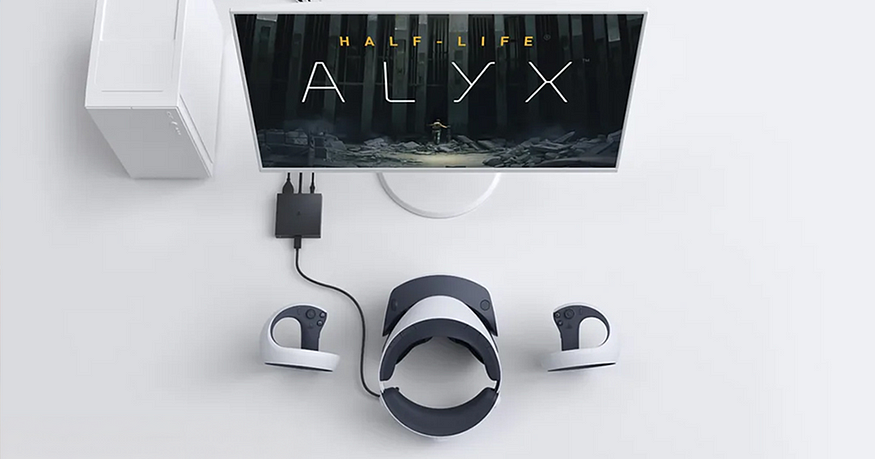
Since its debut, Sony’s PlayStation VR2 has set a new benchmark in console VR with its stunning 4K HDR OLED display, wide field of view, and innovative eye-tracking technology. However, that invisible “wall” — its exclusivity to the PlayStation 5 — has always left the vast community of PC VR enthusiasts and players on the SteamVR platform looking on with envy. Now, Sony has finally extended an olive branch: the arrival of the PlayStation VR2 PC Adapter officially signals that this top-tier headset is stepping into the broader PC world. This isn’t just a technical extension; it could potentially be a storm reshaping the PC VR landscape. But is this cross-platform journey a smooth highway, or a rocky path paved with caveats?

The Tech Core: What the Adapter Can and Cannot Do
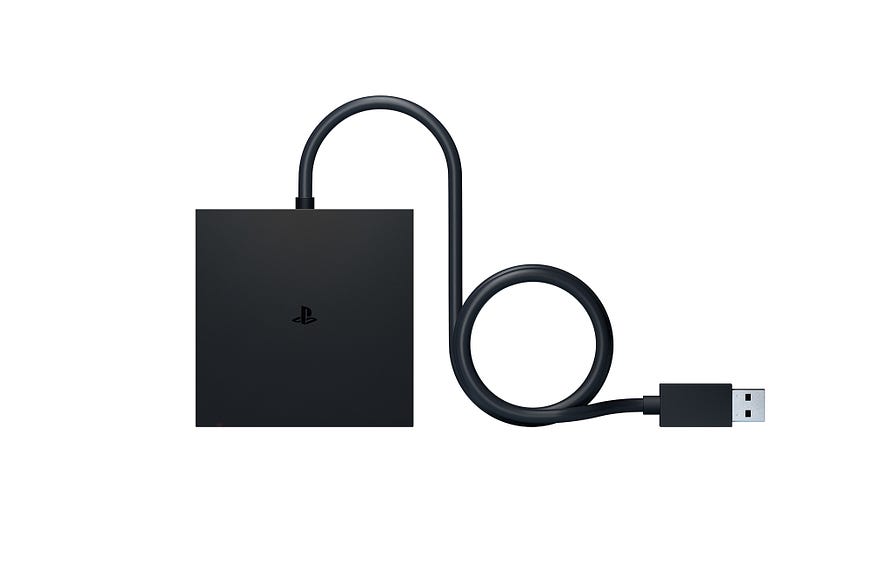
From a hardware perspective, this official adapter acts as the crucial “interpreter.” It requires a DisplayPort 1.4 cable (sold separately — this is key!) plugged into your PC’s graphics card, handles data transfer via USB, connects to the original PS VR2 cable, and requires power. Sony has clearly listed the minimum PC requirements, generally landing around an NVIDIA GeForce RTX 3060 or AMD Radeon RX 6600XT-level graphics card, paired with appropriate CPU and RAM — essentially the current entry threshold for mainstream PC VR.
The setup process involves downloading and installing the “PlayStation VR2 App” and SteamVR drivers. Once configured, the PC recognizes the PS VR2, unlocking its core visual capabilities:
- A Stunning Visual Feast: The per-eye 2000 x 2040 resolution OLED screens are fully utilized on PC, delivering deep blacks, vibrant contrast, and a fluid refresh rate of up to 120Hz. This is undoubtedly among the top visual specifications in the current PC VR market.
- Wide FOV & Inside-Out Tracking: The approximate 110-degree field of view (FOV) and the headset-based camera Inside-Out tracking system are retained, offering convenient and precise 6DoF spatial tracking without external base stations.
- 3D Audio: The 3D audio experience delivered through the standard 3.5mm headphone jack remains, further enhancing immersion.
However, like all cross-platform solutions, compromises are inevitable. Due to architectural differences and potential business considerations, some of the PS VR2’s signature features are disabled on PC:
- HDR is Absent: HDR display is not supported in PC mode, meaning the signature high dynamic range color performance will be diminished.
- No Headset Feedback: The vibration feedback built into the headset itself will not function.
- Eye Tracking Disabled: This highly promising technology, including its derived foveated rendering optimization, is not supported on PC at this time.
- The “Soul” of the Sense Controllers: Adaptive Triggers and the controllers’ own Haptic Feedback — two major immersion enhancers — will not work in PC mode, reverting them to “standard” VR controllers.
The Gaming Experience: Exploring a New World & The Missing Touch
So, what does it actually feel like to put on the adapter-connected PS VR2 and step into the world of SteamVR?
First, the visual impact is undeniable. Firing up titles like Half-Life: Alyx or Microsoft Flight Simulator VR, the crisp, sharp image, the OLED panel with a virtually imperceptible screen-door effect, and the silky smooth 120Hz motion truly deliver a top-tier visual immersion. For players prioritizing visual fidelity above all else, this alone is highly attractive. The Inside-Out tracking performs reliably and stably, accurately capturing movements whether in intense shooters or precision-demanding simulators.
However, the sense of loss emerges when you grip the Sense controllers, expecting the trigger resistance in Pistol Whip or the feedback of a melee swing in The Walking Dead: Saints & Sinners. Without adaptive triggers and haptic feedback, the Sense controllers feel like they’ve lost their soul. While still comfortable to hold and operate, that unique tactile connection to the virtual world is significantly reduced. It’s like driving a supercar with the engine sound muted — it’s still incredibly fast, but something essential feels missing.
The absence of eye-tracking might not impact most games significantly in the short term, but long-term, the inability to leverage foveated rendering for performance optimization means you’ll need even more powerful PC hardware to fully exploit the headset’s high resolution potential.
Market Positioning & Player Choice: Who Should Buy It?
The arrival of the PlayStation VR2 PC Adapter introduces an interesting variable into the PC VR market.
- For Existing PS VR2 Owners: This is undoubtedly a high-value proposition. By purchasing the adapter and a DisplayPort cable, they can immediately unlock the vast SteamVR library, greatly expanding the headset’s utility. Despite the functional sacrifices, the ability to experience major PC VR titles at a relatively low additional cost is very appealing.
- For PC Players Without a VR Headset: This is an option that requires careful consideration. The total cost of a PS VR2 + Adapter might be comparable to or higher than other mid-to-high-end PC VR headsets (like the Meta Quest 3, HP Reverb G2, etc.). The comparison point becomes: PS VR2’s top-tier OLED visual quality vs. potentially better ecosystem integration from other headsets (e.g., Quest’s wireless streaming, more mature controller haptics solutions for PC). If you intensely value visual quality and don’t mind losing the unique features, this path is worth considering; otherwise, there might be more “native” PC VR options available.
Conclusion: A New Dawn, But Also a Choice
Sony’s PlayStation VR2 PC Adapter is undoubtedly an exciting technological breakthrough. It breaks down platform barriers, allowing top-tier display technology to serve a wider player base. It successfully brings the PS VR2’s core strengths — exceptional visual fidelity and reliable tracking — to the PC platform, offering SteamVR players a highly attractive high-resolution option.
However, this is not a perfect transplant. The absence of HDR, eye-tracking, and the signature feedback features of the Sense controllers are clear compromises that impact its full immersive potential. It feels more like a gateway to a new world, but some of the furniture hasn’t been moved in yet.
Ultimately, the PlayStation VR2 PC Adapter is best suited for existing users already captivated by the PS VR2’s visual prowess and eager to explore the boundless universe of SteamVR. For purely new PC VR players, it presents a tempting high-fidelity option, but one accompanied by functional trade-offs. This adapter represents a new dawn for PC VR possibilities with this hardware, but the choice ultimately lies with the player, balancing priorities between visuals, immersion, and platform feature completeness. Before clicking “buy,” ensure your PC meets the requirements, and be crystal clear about what you’re gaining, and… what you’ll be missing.



 LaLaWiz Games
Leave a comment